Let the desktop wallpaper, the Capybara Flickr photos stylish
- January 7, 2012
- Category: capybara
- Posted by: 3106Org
- I the first to leave a comment

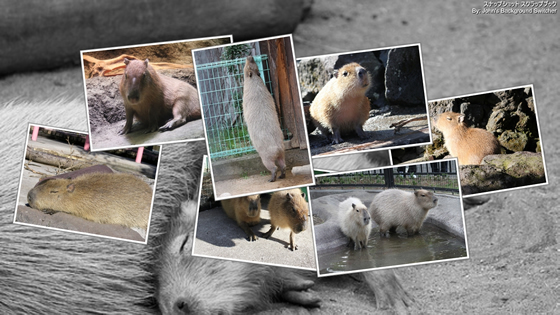
And? "Is there a wallpaper of capybara", it is often asked, but because it is an image file after all even if I say wallpaper, "please photo archive of this place such as. Please use it to download your favorite pictures from ", I've been to for example? "as it were picked up in the image search on Google", the unkind little guidance, but it will introduce one for "How to automatically generate a wallpaper Capybara" this time.
Specifically, Flickr is a way to make desktop wallpaper to get a picture of. When you do this, for example, you can set the wallpaper daily Capybaras photo. Besides automatically. You can also put a stylish effect to the wallpaper. By the way, I will this time with Windows in that de facto PC world of the environment. Since setting a picture of Flickr, that you have a Flickr account also is a prerequisite.
First, free software wallpaper setting, John's Background Switcher I install the. You can download it by clicking the place where it is written as "Download the Installer". . I think there is also (similar software, but John's is the easy-to-use A soft because it is Japanese); ^ _ ^ (Please do not crap just because English
When the installation is complete, I will set the capybara wallpaper. I will introduce in that the setting example of one destination from here. So you can change settings at any time later, first, please try anyway.
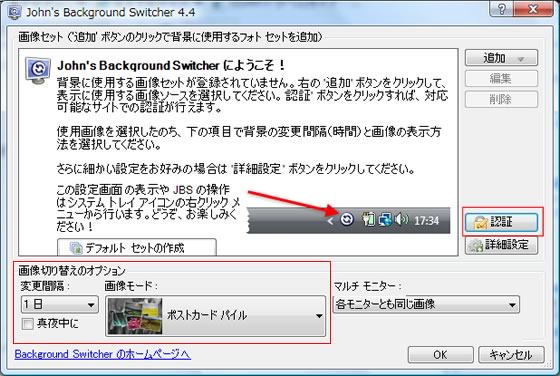
First, the "one day" the change interval of switching options of the image. I set the "post-card pile" the image mode. Then click the "Authentication" button so do the account authentication of Flickr.
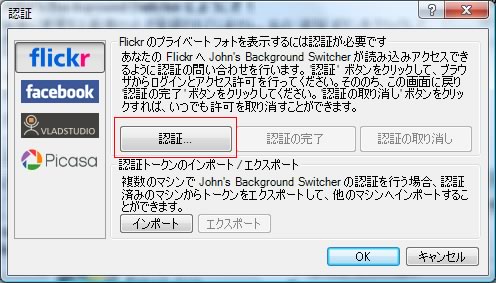
Authentication settings screen will come out, click the "Authentication" button. Flickr site is displayed, please sign in to Flickr.
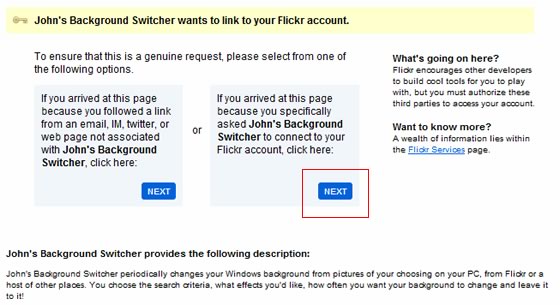
I will link to your Flickr account and software.
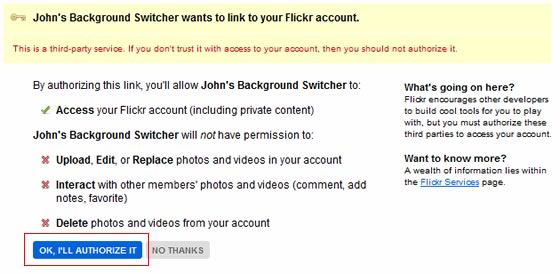
And OK to confirm.
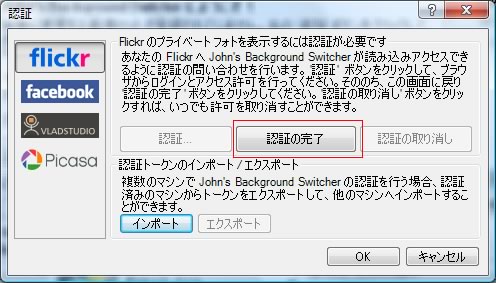
Return to the authentication settings screen, click the button "Finish Authentication". Flickr authentication is now complete.
It is finally set Capybara image.
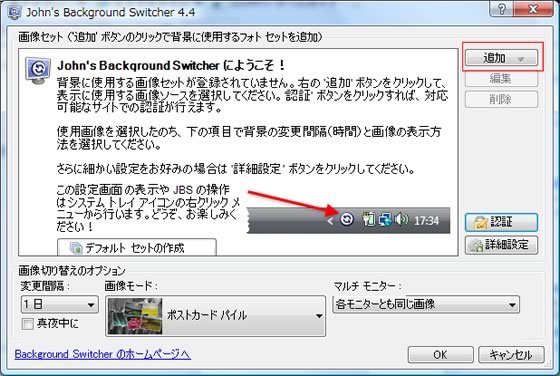
Click the image set the "Add" button, and then select the "Flickr".
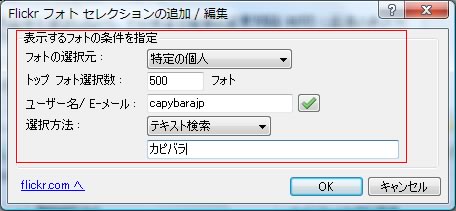
You can set the conditions to get photos from Flickr. For example, you might want to try the above configuration. In this configuration example, we have set up to get photos of the capybara related Flickr account from our "capybarajp".
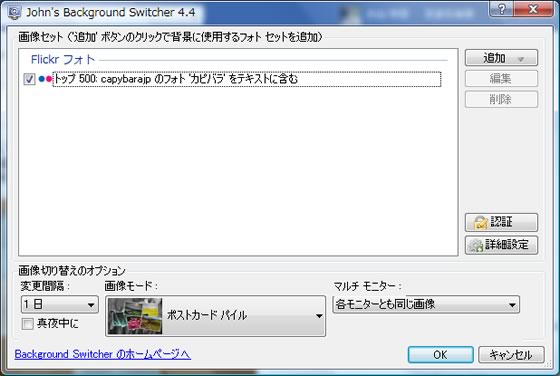
The image set, set of Flickr photos have been added. Setup is now complete for the time being at least, to close the setting screen by pressing the "OK".
You can set the capybara wallpaper on your desktop, wallpaper will be set by right-clicking the icon on the taskbar of "John's Background Switcher", if you click on the "Display the background of the next".
OK wallpaper If you are set for such a feeling!
By the way, if you press many times the "Display the background of the next", wallpaper will be switched. In addition, by changing the conditions of image acquisition and switching options of the image, please try so that you can automatically be set via the wallpaper of various styles.
Capybara wallpaper as daily in the preceding configuration recommended N It is (post-card pile display).
In! Isuzu / `d '\
Also of interest:
- The Capybara photos recommended for wallpaper
- Capybara group on Flickr is an excellent review
- The Capybara photos recommended for wallpaper-standby
- Capybara slide show (Caplin Rous)
- Capybara Photos of all GW
- Photos of capybara in Saitama Children Animals Nature Park
- capybara hiccups that will not stop
- Press pot of capybara. Golon
- Capybara's Ueno Zoo
- Throat over the capybara came to Inokashira Park!